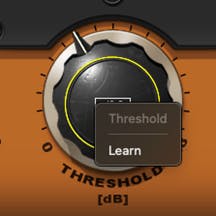
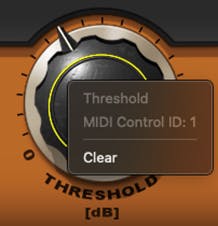
You can create MIDI maps for multiple controllers in multiple setups (e.g., a different map for each controller), or different MIDI maps for different uses on the same controller (e.g., one map for recording and another for mixing).
On a plugin-to-plugin basis, you can save this unique MIDI mapping and load it just like loading any other preset. The difference is that this preset loads only the MIDI mapping and will not modify other plugin settings.
To save a MIDI map, go to “MIDI Map” in the Preset Menu and choose “Save MIDI Map to New File.”
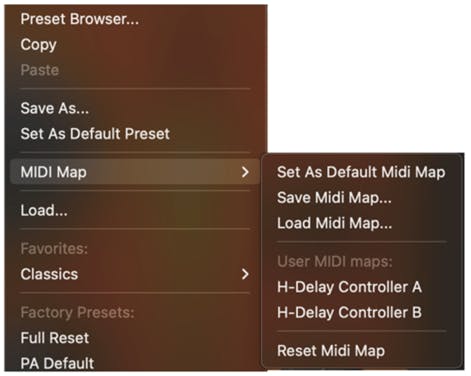
This creates a preset file whose extension is “xpm.” It can be loaded through the MIDI Map menu. This file is saved into the relevant Plugins Settings folder, like any other preset.
As you save more MIDI maps, the list grows. The list appears only in the MIDI Map submenu of the Preset menu—not in the Preset Browser. You can also set the current preset as the default mapping: click the preset menu and choose “Set As Default MIDI Map.” Even after loading a saved MIDI map, you can edit its status. Right-click on control and select “Clear” to disconnect a parameter from MIDI control.
Previous Versions Preset Support
From V15, all Waves plugins can be controlled by MIDI. In previous versions, only selected plug-ins had MIDI learn functionality, and the MIDI was saved per preset.
To retrieve such a MIDI map, duplicate the preset loaded in the plugin settings folder and add “[MIDI]” before the .xps suffix. Now you can load it from the MIDI map menu and only MIDI settings will be applied. Plugin settings will not be loaded.
<div class="msg-box text-left mb-12">You may find this content helpful: To be able to view it, <a href="/legal/cookie-policy" target="_top" title="">allow Performance Cookies here</a>.</div>
False
False
e0d69004-fccd-4680-9194-6ac267d4fede
True
Start Free
true
true
false
voTekqO2wEJBRRQbsEWTHeJEaV5FbTWvet3JZATG
652445
6LeG-IcUAAAAAIb42eguHdUztlZNcrLPhuk81WSM
6LftoDMUAAAAAC9QpaYXNehGHSu__XxRJyFAIgkJ
6LeIxAcTAAAAAJcZVRqyHh71UMIEGNQ_MXjiZKhI
10
5
2026
8
23
30
80
30
#000000
#fff
#fff
#000
#e8e8e8
{
"before": [{
"text": "Waves Creative Access",
"link": "/subscriptions",
"design": "link"
}, {
"text": "Start Free",
"link": "/subscriptions",
"design": "button"
}
],
"beforeOlm": [{
"text": "AI Mastering Online",
"link": "/online-mastering",
"design": "link"
}, {
"text": "Try Now",
"link": "/online-mastering",
"design": "button"
}
],
"topMenu": [{
"text": "Products",
"link": "/products",
"subMenu": [{
"sectionTitle": "Plugins",
"sectionItems": [{
"text": "Plugins",
"link": "/plugins",
"tagline": "Shape your mixes, masters and productions with award-winning plugins",
"icon": "plugins"
}, {
"text": "Bundles",
"link": "/bundles",
"tagline": "Save big on your favorite tools with our curated plugin collections",
"icon": "bundles"
}, {
"text": "Waves Creative Access",
"link": "/subscriptions",
"tagline": "Subscribe to the world’s biggest plugin collection: Try free for 7 days",
"icon": "creative-access"
}, {
"text": "StudioVerse",
"link": "/studioverse",
"tagline": "Access a massive online library of plugin chains directly from your DAW",
"icon": "studioverse"
}, {
"text": "Mixers & Racks",
"link": "/mixers-racks",
"tagline": "Mix with the Waves LV1 mixer console or supercharge your setup with real-time plugin racks",
"icon": "mixers-racks"
}, {
"text": "Waves Audio Courses",
"link": "/courses",
"tagline": "Level up your skills with courses taught by Grammy–winning engineers",
"icon": "courses"
}
]
}, {
"sectionTitle": "Online Services",
"sectionItems": [{
"text": "AI Mastering Online",
"link": "/online-mastering",
"tagline": "Master your tracks online with Grammy-winning AI technology ",
"icon": "olm"
}, {
"text": "Voice ReGen",
"link": "/voice-regen",
"tagline": "Remove Background Noise from Audio and Video w/ AI",
"icon": "illugen"
}, {
"text": "ILLUGEN",
"link": "/illugen",
"tagline": "AI text-to-sample engine: Generate sounds from your wild imagination",
"icon": "illugen"
}, {
"text": "Waves Stream",
"link": "/plugins/waves-stream",
"tagline": "Stream audio in real time when collaborating remotely",
"icon": "stream"
}
]
}, {
"sectionTitle": "Hardware",
"sectionItems": [{
"text": "eMotion LV1 Classic",
"link": "/mixers-racks/emotion-lv1",
"tagline": "",
"icon": "hardware"
}, {
"text": "SuperRack LiveBox",
"link": "/hardware/superrack-livebox",
"tagline": "",
"icon": "hardware"
}, {
"text": "SoundGrid Servers",
"link": "/hardware/soundgrid-servers",
"tagline": "",
"icon": "hardware"
}, {
"text": "SoundGrid Interfaces",
"link": "/hardware/soundgrid-interfaces",
"tagline": "",
"icon": "hardware"
}, {
"text": "System Builder",
"link": "/system-builder",
"tagline": "Customize your Waves system for live sound mixing",
"icon": "system-builder"
}, {
"text": "All Hardware",
"link": "/hardware",
"tagline": "Mix with the Waves LV1 Classic console or by adding real-time processing to any console",
"icon": "hardware"
}
]
}
]
}, {
"text": "Solutions",
"link": "/solutions",
"subMenu": [{
"sectionTitle": "Studio",
"sectionItems": [{
"text": "Plugins",
"link": "/plugins",
"tagline": "Shape your mixes, masters and productions with award-winning plugins",
"icon": "plugins"
}, {
"text": "Bundles",
"link": "/bundles",
"tagline": "Save big on your favorite tools with our curated plugin collections",
"icon": "bundles"
}, {
"text": "Waves Creative Access",
"link": "/subscriptions",
"tagline": "Subscribe to the world’s biggest plugin collection: Try free for 7 days",
"icon": "creative-access"
}, {
"text": "AI Mastering Online",
"link": "/online-mastering",
"tagline": "Master your tracks online with Grammy-winning AI technology ",
"icon": "olm-blue"
}, {
"text": "StudioVerse",
"link": "/studioverse",
"tagline": "Access a massive online library of plugin chains directly from your DAW",
"icon": "studioverse"
}, {
"text": "Voice ReGen",
"link": "/voice-regen",
"tagline": "Remove Background Noise from Audio and Video w/ AI",
"icon": "illugen"
}, {
"text": "ILLUGEN",
"link": "/illugen",
"tagline": "AI text-to-sample engine: Generate sounds from your wild imagination",
"icon": "illugen-blue"
}
]
}, {
"sectionTitle": "Live Sound",
"sectionItems": [{
"text": "Live Sound",
"link": "/live-sound",
"tagline": "Bring studio-quality sound to live events of any size",
"icon": "live-sound"
}, {
"text": "Houses of Worship",
"link": "/houses-of-worship",
"tagline": "Deliver crystal-clear sound to every seat and every stream, trusted by churches worldwide",
"icon": "how"
}, {
"text": "Broadcast Audio",
"link": "/broadcast-audio",
"tagline": "Mix superior broadcast sound, including cloud-based solutions",
"icon": "broadcast"
}
]
}, {
"sectionTitle": "Consumer Audio",
"sectionItems": [{
"text": "Waves Maxx",
"link": "https://maxx.com",
"tagline": "Enhance laptops, tablets, and speakers with studio-grade audio technology",
"icon": "maxx"
}
]
}
]
}, {
"text": "Downloads",
"link": "/downloads",
"subMenu": [{
"sectionTitle": "Downloads",
"sectionItems": [{
"text": "Waves Central",
"link": "/downloads/central",
"tagline": "Download Waves Central to install or update Waves products",
"icon": "central"
}, {
"text": "All Downloads",
"link": "/downloads",
"tagline": "Browse all available downloads",
"icon": "all-downloads"
}
]
}
]
}, {
"text": "Support",
"link": "/support ",
"subMenu": [{
"sectionTitle": "Support",
"sectionItems": [{
"text": "Install & Activate Products",
"link": "/support/activate",
"tagline": "Get help with the installation and activation of Waves products",
"icon": "install-activate"
}, {
"text": "System Requirements",
"link": "/support/tech-specs/system-requirements",
"tagline": "Review specs to ensure full compatibility with Waves products",
"icon": "system-req"
}, {
"text": "All Support Articles",
"link": "/support",
"tagline": "Explore tips, how-to guides, and troubleshooting in our knowledge base",
"icon": "support-articles"
}, {
"text": "Contact Us",
"link": "/contact-us",
"tagline": "Need help? Our world-class support team is here for you",
"icon": "contact-us"
}
]
}
]
}, {
"text": "Learn",
"link": "/learn",
"subMenu": [{
"sectionTitle": "",
"sectionItems": [{
"text": "Videos",
"link": "/videos",
"tagline": "Watch quick tutorials and deep-dive walkthroughs",
"icon": "videos"
}, {
"text": "Blog",
"link": "/blog",
"tagline": "Read expert insights, tips, and creative techniques",
"icon": "blog"
}, {
"text": "By Topic",
"link": "/tags",
"tagline": "Explore content by category",
"icon": "by-topic"
}, {
"text": "Courses",
"link": "/courses",
"tagline": "Level up your skills with courses taught by Grammy–winning engineers",
"icon": "courses-red"
}
]
},
{
"sectionTitle": "",
"sectionItems": [{
"text": "News",
"link": "/news",
"tagline": "Catch the latest updates and releases from Waves",
"icon": "news"
}, {
"text": "Artists",
"link": "/artists",
"tagline": "See the top creators that use Waves in their sessions",
"icon": "artists"
}, {
"text": "Events",
"link": "/events",
"tagline": "Find out where Waves is showing up live and online",
"icon": "events"
}, {
"text": "Forum",
"link": "https://forum.waves.com",
"tagline": "Join the conversation with fellow producers and engineers",
"icon": "forum"
}
]
}
]
}, {
"text": "Specials",
"link": "/specials"
}
]
}
[{"bannerGUID":"2e76fc8a-3a6d-4461-8d47-240c619ea29b","bannerDisplayName":"Vocal Plugin Sale - May 2026","bannerTypeGUID":"dd5f8368-6b03-465f-b570-48baddb35b08","typeName":"OfferFooter","bannerImage":"/images/footer-offer/2026/may/vocal-sale-may-2026.jpg","bannerURL":"/plugins/vocal","bannerPriority":1,"bannerTitle":"Vocal Plugin Sale: Shop Plugins","gaValue":"vocal-sale-may-2026"},{"bannerGUID":"a04448ca-692d-465a-94b9-b9c04bcfd552","bannerDisplayName":"Free Plugin Bonus - May 2026","bannerTypeGUID":"dd5f8368-6b03-465f-b570-48baddb35b08","typeName":"OfferFooter","bannerImage":"/images/footer-offer/2026/may/50-80-free-plugins-vocal-sale-may-2026.jpg","bannerURL":"/free-plugins-spend-50-spend-80-sale-april-may-2026","bannerPriority":2,"bannerTitle":"Free Plugin Bonus","gaValue":"50-80-free-plugins-vocal-sale-may-2026"},{"bannerGUID":"d4286ff5-e6de-4b2f-8bc9-e96a46843f09","bannerDisplayName":"ILLUGEN 2.0 - April 2026","bannerTypeGUID":"dd5f8368-6b03-465f-b570-48baddb35b08","typeName":"OfferFooter","bannerImage":"/images/footer-offer/2026/april/illugen-april-2026.jpg","bannerURL":"/illugen","bannerPriority":4,"bannerTitle":"New! ILLUGEN 2.0","gaValue":"illugen-april-2026"},{"bannerGUID":"e9238c9a-ec9b-4669-b6c9-12a38974902a","bannerDisplayName":"My Recommended Products","bannerTypeGUID":"dd5f8368-6b03-465f-b570-48baddb35b08","typeName":"OfferFooter","bannerImage":"/images/footer-offer/2023/november/my-recommended-products-bf.jpg","bannerURL":"/my-recommended-products","bannerPriority":5,"bannerTitle":"Personal Product Recommendations: See Products","gaValue":"my-recommended-products"},{"bannerGUID":"e6b77202-75d8-4086-b586-af00dc3c289a","bannerDisplayName":"Upgrades","bannerTypeGUID":"dd5f8368-6b03-465f-b570-48baddb35b08","typeName":"OfferFooter","bannerImage":"/images/footer-offer/2023/september/upgrades.jpg","bannerURL":"/account/upgrades","bannerPriority":6,"bannerTitle":"Upgrade to a Bigger Bundle: See Upgrades","gaValue":"upgrade-to-a-bigger-bundle"},{"bannerGUID":"ba16dbd5-bdde-40ea-8517-cb420402d004","bannerDisplayName":"Waves V16 Update","bannerTypeGUID":"dd5f8368-6b03-465f-b570-48baddb35b08","typeName":"OfferFooter","bannerImage":"/images/footer-offer/2025/december/v16-update-dec-2025.jpg","bannerURL":"/v16","bannerPriority":7,"bannerTitle":"V16 Update: Learn More","gaValue":"v16-update-dec-2025"}]