17
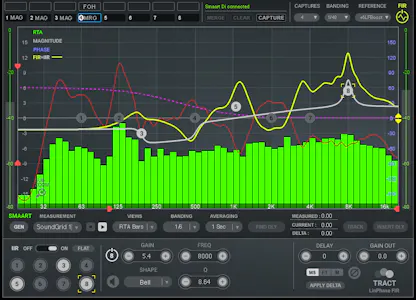
{"systemRequirements":[{"platform":1,"content":"\u003Cdiv \u003E\u003Cstrong\u003ECPU\u003C/strong\u003E\u003Cbr /\u003E\r\nIntel or Silicon Architecture\u003Cbr /\u003E\r\n\u003Ca href=\u0022/support/waves-with-apple-silicon-processors\u0022\u003ESee notes regarding Apple Silicon based processors\u003C/a\u003E\u003Cbr /\u003E\r\n\u003Cbr /\u003E\r\n\u003Cstrong\u003EMemory\u003C/strong\u003E\u003Cbr /\u003E\r\n16 GB RAM\u003Cbr /\u003E\r\n30 GB free disk space on the system drive\u003Cbr /\u003E\r\n\u003Cbr /\u003E\r\n\u003Cstrong\u003EOperating System\u003C/strong\u003E\u003Cbr /\u003E\r\nmacOS Sonoma 14, Sequoia 15, Tahoe 26, Golden Gate 27\u003Cbr /\u003E\r\n\u003Cbr /\u003E\r\n\u003Cstrong\u003EScreen Resolution\u003C/strong\u003E\u003Cbr /\u003E\r\n\r\nRecommended: 1920x1080\u003Cbr /\u003E\r\nUSB displays are not supported as the primary display.\u003Cbr /\u003E\r\n\u003Cbr /\u003E\r\n\u003C/div\u003E"},{"platform":2,"content":"\u003Cdiv \u003E\u003Cstrong\u003ECPU\u003C/strong\u003E\u003Cbr /\u003E\r\nX64 compatible Intel or AMD CPU\u003Cbr /\u003E\r\n\u003Cbr /\u003E\r\n\u003Cstrong\u003EMemory\u003C/strong\u003E\u003Cbr /\u003E\r\n16 GB RAM\u003Cbr /\u003E\r\n30 GB free disk space on the system drive\u003Cbr /\u003E\r\n\u003Cbr /\u003E\r\n\u003Cstrong\u003EOperating System\u003C/strong\u003E\u003Cbr /\u003E\r\nWindows 10 64 bit\u003Cbr /\u003E\r\nWindows 11\u003Cbr /\u003E\r\n\u003Cbr /\u003E\r\n\u003Cstrong\u003EScreen Resolution\u003C/strong\u003E\u003Cbr /\u003E\r\n\r\nRecommended: 1920x1080\u003C/div\u003E\r\n"}],"topBanner":"","bottomBanner":"\u003Cdiv class=\u0022info-box\u0022\u003E\r\n \u003Cp class=\u0022waves-h4\u0022\u003EExceptions \u0026amp; Notes:\u003C/p\u003E\r\n\t\u003Cp class=\u0022font-bold pb-2\u0022\u003EUsing TRACT with TRACT-Measure:\u003C/p\u003E\r\n\t\u003Cul class=\u0022waves-ul pb-2\u0022\u003E\r\n \u003Cli\u003ETRACT Measure and TRACT can be used together on the same system; separate computers are not required.\u003C/li\u003E\r\n\t\u003C/ul\u003E\r\n\t\u003Cp class=\u0022font-bold py-2\u0022\u003EUsing TRACT with SMAART:\u003C/p\u003E\r\n \u003Cul class=\u0022waves-ul pb-2\u0022\u003E\r\n \r\n\t \u003Cli\u003EWhen using TRACT with Waves Live Applications, we highly recommend running Smaart on a separate computer.\u003C/li\u003E\r\n \u003Cli\u003ESmaart V9 is only supported with TRACT V14.12 and higher.\u003C/li\u003E\r\n \u003Cli\u003E\r\n \u003Cspan class=\u0022font-bold\u0022\u003EUsing TRACT and Smaart on Separate Computers over a SoundGrid Network:\u003C/span\u003E\r\n \u003Cspan\u003E\r\n If TRACT is running on a SoundGrid host (i.e. MultiRack SoundGrid, eMotion LV1) and Smaart is running on a separate computer, you must use a separate, dedicated network adapter to remotely control Smaart\u0026rsquo;s functions.\r\n \u003Cbr /\u003E\r\n For more information, please see the \u003Ca href=\u0022https://assets.wavescdn.com/pdf/plugins/tract-v3.pdf\u0022 target=\u0022_blank\u0022\u003ETRACT User Guide\u003C/a\u003E.\r\n \u003C/span\u003E\r\n \u003C/li\u003E\r\n \u003Cli\u003E\r\n \u003Cspan class=\u0022font-bold\u0022\u003EConnecting to Smaart over Wi-Fi while Running SoundGrid:\u003C/span\u003E\r\n \u003Cspan\u003E\r\n If TRACT is running in a SoundGrid application, we do not recommend using Wi-Fi for connecting to Smaart. This connection is possible, but it can degrade the performance of SoundGrid applications, such as MultiRack\r\n SoundGrid, eMotion ST Mixer, or eMotion LV1.\r\n \u003C/span\u003E\r\n \u003C/li\u003E\r\n \u003Cli\u003EFor proper measurement data to pass from Smaart to TRACT, first make sure the measurement in Smaart displays as expected, and only then connect to TRACT.\r\n \u003Cspan\u003EThe sequence of actions is : Run Smaart \u003E Configure Smaart\u2019s audio setup \u003E Run Measurement of choice and verify the measurement displays as expected \u003E Connect TRACT to Smaart.\u003C/span\u003E\r\n \u003C/li\u003E\r\n \u003Cli\u003EOn Windows, using Smaart with the Waves SoundGrid Driver v15 and TRACT is supported only with Smaart v9 or later.\u003C/li\u003E\r\n \u003C/ul\u003E\r\n\u003C/div\u003E"}
{"productHosts":[{"hostID":1,"hostVersionID":1,"osid":1,"hostVersion":"2025.12, 2026.4","hostFormat":"AAX Native, Audiosuite","isDefault":true,"commentGUID":"","hostName":"Pro Tools","hostComment":"","productHostComment":"","itemOrder":1},{"hostID":2,"hostVersionID":2,"osid":1,"hostVersion":"12","hostFormat":"Audio Units","isDefault":true,"commentGUID":"","hostName":"Logic Pro","hostComment":"","productHostComment":"","itemOrder":2},{"hostID":3,"hostVersionID":3,"osid":1,"hostVersion":"11","hostFormat":"Audio Units","isDefault":true,"commentGUID":"","hostName":"Digital Performer","hostComment":"","productHostComment":"","itemOrder":3},{"hostID":4,"hostVersionID":4,"osid":1,"hostVersion":"12","hostFormat":"VST3","isDefault":true,"commentGUID":"","hostName":"Ableton Live","hostComment":"","productHostComment":"","itemOrder":4},{"hostID":5,"hostVersionID":5,"osid":1,"hostVersion":"15","hostFormat":"VST3","isDefault":true,"commentGUID":"","hostName":"Nuendo","hostComment":"","productHostComment":"","itemOrder":5},{"hostID":6,"hostVersionID":6,"osid":1,"hostVersion":"15","hostFormat":"VST3","isDefault":true,"commentGUID":"","hostName":"Cubase","hostComment":"","productHostComment":"","itemOrder":6},{"hostID":7,"hostVersionID":7,"osid":1,"hostVersion":"4","hostFormat":"Audio Units","isDefault":true,"commentGUID":"","hostName":"Main Stage","hostComment":"","productHostComment":"","itemOrder":7},{"hostID":8,"hostVersionID":8,"osid":1,"hostVersion":"10.4","hostFormat":"Audio Units","isDefault":true,"commentGUID":"","hostName":"Garage Band","hostComment":"","productHostComment":"","itemOrder":8},{"hostID":9,"hostVersionID":9,"osid":1,"hostVersion":"26","hostFormat":"VST3","isDefault":true,"commentGUID":"","hostName":"Audition","hostComment":"","productHostComment":"","itemOrder":9},{"hostID":10,"hostVersionID":10,"osid":1,"hostVersion":"26","hostFormat":"VST3","isDefault":true,"commentGUID":"","hostName":"Premiere Pro","hostComment":"","productHostComment":"","itemOrder":10},{"hostID":12,"hostVersionID":12,"osid":1,"hostVersion":"25","hostFormat":"VST3","isDefault":true,"commentGUID":"","hostName":"FL Studio","hostComment":"","productHostComment":"","itemOrder":12},{"hostID":13,"hostVersionID":13,"osid":1,"hostVersion":"7","hostFormat":"VST3","isDefault":true,"commentGUID":"","hostName":"REAPER","hostComment":"","productHostComment":"","itemOrder":13},{"hostID":14,"hostVersionID":14,"osid":1,"hostVersion":"13","hostFormat":"VST3","isDefault":true,"commentGUID":"","hostName":"Reason","hostComment":"","productHostComment":"","itemOrder":14},{"hostID":15,"hostVersionID":15,"osid":1,"hostVersion":"3","hostFormat":"VST3","isDefault":true,"commentGUID":"","hostName":"Maschine","hostComment":"","productHostComment":"","itemOrder":15},{"hostID":16,"hostVersionID":16,"osid":1,"hostVersion":"3","hostFormat":"VST3","isDefault":true,"commentGUID":"","hostName":"Komplete Kontrol","hostComment":"","productHostComment":"","itemOrder":16},{"hostID":17,"hostVersionID":17,"osid":1,"hostVersion":"6","hostFormat":"VST3","isDefault":true,"commentGUID":"","hostName":"Bitwig Studio","hostComment":"","productHostComment":"","itemOrder":17},{"hostID":18,"hostVersionID":18,"osid":1,"hostVersion":"2","hostFormat":"Audio Units","isDefault":true,"commentGUID":"","hostName":"Luna","hostComment":"","productHostComment":"","itemOrder":18},{"hostID":30,"hostVersionID":75,"osid":1,"hostVersion":"32","hostFormat":"(Intel Only)","isDefault":true,"commentGUID":"f2c3556f-4701-4d08-acd5-1dc24863ad01","hostName":"OBS Studio","hostComment":"Via \u003Ca href=\u0022/support/how-to-use-waves-plugins-in-obs\u0022\u003EStudioVerse\u003C/a\u003E, Stereo only","productHostComment":"","itemOrder":29},{"hostID":26,"hostVersionID":73,"osid":1,"hostVersion":"21","hostFormat":"VST3","isDefault":true,"commentGUID":"","hostName":"Davinci Resolve","hostComment":"","productHostComment":"","itemOrder":30},{"hostID":31,"hostVersionID":89,"osid":1,"hostVersion":"8","hostFormat":"VST3","isDefault":true,"commentGUID":"","hostName":"Fender Studio Pro","hostComment":"","productHostComment":"","itemOrder":31},{"hostID":1,"hostVersionID":19,"osid":2,"hostVersion":"2025.12, 2026.4","hostFormat":"AAX Native, Audiosuite","isDefault":true,"commentGUID":"","hostName":"Pro Tools","hostComment":"","productHostComment":"","itemOrder":1},{"hostID":4,"hostVersionID":20,"osid":2,"hostVersion":"12","hostFormat":"VST3","isDefault":true,"commentGUID":"","hostName":"Ableton Live","hostComment":"","productHostComment":"","itemOrder":4},{"hostID":5,"hostVersionID":21,"osid":2,"hostVersion":"15","hostFormat":"VST3","isDefault":true,"commentGUID":"","hostName":"Nuendo","hostComment":"","productHostComment":"","itemOrder":5},{"hostID":6,"hostVersionID":22,"osid":2,"hostVersion":"15","hostFormat":"VST3","isDefault":true,"commentGUID":"","hostName":"Cubase","hostComment":"","productHostComment":"","itemOrder":6},{"hostID":9,"hostVersionID":24,"osid":2,"hostVersion":"26","hostFormat":"VST3","isDefault":true,"commentGUID":"","hostName":"Audition","hostComment":"","productHostComment":"","itemOrder":9},{"hostID":10,"hostVersionID":25,"osid":2,"hostVersion":"26","hostFormat":"VST3","isDefault":true,"commentGUID":"","hostName":"Premiere Pro","hostComment":"","productHostComment":"","itemOrder":10},{"hostID":12,"hostVersionID":30,"osid":2,"hostVersion":"25","hostFormat":"VST3","isDefault":true,"commentGUID":"","hostName":"FL Studio","hostComment":"","productHostComment":"","itemOrder":12},{"hostID":13,"hostVersionID":31,"osid":2,"hostVersion":"7","hostFormat":"VST3","isDefault":true,"commentGUID":"","hostName":"REAPER","hostComment":"","productHostComment":"","itemOrder":13},{"hostID":14,"hostVersionID":32,"osid":2,"hostVersion":"13","hostFormat":"VST3","isDefault":true,"commentGUID":"","hostName":"Reason","hostComment":"","productHostComment":"","itemOrder":14},{"hostID":15,"hostVersionID":33,"osid":2,"hostVersion":"3","hostFormat":"VST3","isDefault":true,"commentGUID":"","hostName":"Maschine","hostComment":"","productHostComment":"","itemOrder":15},{"hostID":16,"hostVersionID":34,"osid":2,"hostVersion":"3","hostFormat":"VST3","isDefault":true,"commentGUID":"","hostName":"Komplete Kontrol","hostComment":"","productHostComment":"","itemOrder":16},{"hostID":17,"hostVersionID":35,"osid":2,"hostVersion":"6","hostFormat":"VST3","isDefault":true,"commentGUID":"","hostName":"Bitwig Studio","hostComment":"","productHostComment":"","itemOrder":17},{"hostID":18,"hostVersionID":77,"osid":2,"hostVersion":"2","hostFormat":"VST3","isDefault":true,"commentGUID":"","hostName":"Luna","hostComment":"","productHostComment":"","itemOrder":18},{"hostID":27,"hostVersionID":76,"osid":2,"hostVersion":"2026.4","hostFormat":"VST3","isDefault":true,"commentGUID":"","hostName":"Cakewalk Sonar","hostComment":"","productHostComment":"","itemOrder":20},{"hostID":20,"hostVersionID":26,"osid":2,"hostVersion":"2026","hostFormat":"VST3","isDefault":true,"commentGUID":"","hostName":"Samplitude","hostComment":"","productHostComment":"","itemOrder":21},{"hostID":21,"hostVersionID":27,"osid":2,"hostVersion":"2026","hostFormat":"VST3","isDefault":true,"commentGUID":"","hostName":"Sequoia","hostComment":"","productHostComment":"","itemOrder":22},{"hostID":22,"hostVersionID":28,"osid":2,"hostVersion":"14","hostFormat":"VST3","isDefault":true,"commentGUID":"","hostName":"Pyramix","hostComment":"","productHostComment":"","itemOrder":23},{"hostID":30,"hostVersionID":72,"osid":2,"hostVersion":"32","hostFormat":"","isDefault":true,"commentGUID":"f2c3556f-4701-4d08-acd5-1dc24863ad01","hostName":"OBS Studio","hostComment":"Via \u003Ca href=\u0022/support/how-to-use-waves-plugins-in-obs\u0022\u003EStudioVerse\u003C/a\u003E, Stereo only","productHostComment":"","itemOrder":29},{"hostID":26,"hostVersionID":74,"osid":2,"hostVersion":"21","hostFormat":"VST3","isDefault":true,"commentGUID":"","hostName":"Davinci Resolve","hostComment":"","productHostComment":"","itemOrder":30},{"hostID":31,"hostVersionID":90,"osid":2,"hostVersion":"8","hostFormat":"VST3","isDefault":true,"commentGUID":"","hostName":"Fender Studio Pro","hostComment":"","productHostComment":"","itemOrder":31}],"topBanner":"\u003Cp class=\u0022pb-4\u0022\u003E\u003Ca href=\u0022/support/waves-with-apple-silicon-processors\u0022\u003EApple Silicon Support\u003C/a\u003E\u003C/p\u003E\n\u003Cul class=\u0022waves-ul md:text-base pl-0\u0022\u003E\n \u003Cli\u003EThe DAW versions listed below are the latest on which we tested and officially qualified each the latest version of our products.\u003C/li\u003E\n \u003Cli\u003EWaves\u2019 latest version works on newer sub-versions of these DAWs, unless stated otherwise.\u003C/li\u003E\n \u003Cli\u003EIf your DAW (or DAW version) is not listed here, we recommend you \u003Ca href=\u0022/support/demo-waves-products\u0022\u003Edemo the product\u003C/a\u003E you wish to purchase to confirm it works.\u003C/li\u003E\n \u003Cli\u003EYour DAW must be running on an operating system that supports it in order for plugins to work properly. To confirm that your DAW version is supported on your operating system, please refer to your DAW\u2019s website.\u003C/li\u003E\n\u003C/ul\u003E","bottomBanner":""}
{"supportedPlatforms":[{"documentName":"TRACT System Calibration","mostAudioHosts":true,"multiRackNative":false,"multiRackSoundGrid":false,"studioRackNative":false,"studioRackSoundGrid":false,"superRackNative":true,"superRackSoundGrid":true,"eMotionSTMixer":true,"eMotionLV1Mixer":true,"diGiCo":false,"venue":true,"studioVerseAudioEffects":false,"studioVerseInstruments":false,"eMotionLV1Classic":true}],"topBanner":"","bottomBanner":"\u003Cul class=\u0022list-none hidden lg:block\u0022\u003E\r\n\t\u003Cli class=\u0022mb-2\u0022\u003E*Check the Supported Hosts tab for more info.\u003C/li\u003E\r\n\t\u003Cli class=\u0022mb-2\u0022\u003E**The last version of StudioRack is V14. The last version of Waves plugins supported in StudioRack is V14.\u003C/li\u003E\r\n\t\u003Cli class=\u0022mb-2\u0022\u003E***The last Waves plugin version supported in MultiRack is v10.\u003C/li\u003E\r\n\t\u003Cli class=\u0022mb-2\u0022\u003E****DiGiCo SD (v929 or earlier) with MultiRack (v9.8 or earlier) embedded.\u003C/li\u003E\r\n\t\u003Cli class=\u0022mb-2\u0022\u003E*****When used with \u003Ca href=\u0022/mixers-racks/soundgrid-rack-for-venue\u0022\u003ESoundGrid Rack for VENUE\u003C/a\u003E. For plugins for VENUE V3\u20133.1.1, \u003Ca href=\u0022/support/avid-venue-v3-compatible-plugins\u0022\u003Esee here\u003C/a\u003E.\u003C/li\u003E\r\n\u003C/ul\u003E"}
{"channelComponents":[{"documentName":"TRACT System Calibration","compsMono":true,"compsStereo":true,"compsMS":false,"comps14":false,"comps15":false,"comps16":false,"comps24":false,"comps25":false,"comps26":false,"comps28":false,"comps4":false,"comps42":false,"comps52":false,"comps54":false,"comps55":false,"comps56":false,"comps62":false,"comps64":false,"comps66":false,"comps68":false,"comps82":false,"comps84":false,"comps86":false,"comps88":false,"compsAmbiXFuMa":false,"compsFuMaAmbiX":false,"chCompComment":"Tract SPL \u0026 Measure - mono only","c360":false,"surround":false}],"topBanner":"","bottomBanner":""}
{"latency":[{"documentName":"TRACT System Calibration","native44":"TRACT: 7 \u003Cbr /\u003E TRACT Linear Phase: 519 \u003Cbr /\u003E SPL \u0026 Measure: 0","native48":"TRACT: 7 \u003Cbr /\u003E TRACT Linear Phase: 519 \u003Cbr /\u003E SPL \u0026 Measure: 0","native88":"TRACT: 7 \u003Cbr /\u003E TRACT Linear Phase: 519 \u003Cbr /\u003E SPL \u0026 Measure: 0","native96":"TRACT: 7 \u003Cbr /\u003E TRACT Linear Phase: 519 \u003Cbr /\u003E SPL \u0026 Measure: 0"}],"topBanner":"\u003Cp class=\u0022pb-2\u0022\u003EThe table below indicates how much latency is produced by each plugin, in \u003Cu\u003Esamples\u003C/u\u003E.\u003C/p\u003E\n\t\u003Cp\u003E\n\t\tNot all plugins support all platforms (MultiRack, StudioRack, eMotion, Venue). Check the Supported Platforms tab for more info.\n\t\u003C/p\u003E","bottomBanner":""}
{"sampleRates":[{"documentName":"TRACT System Calibration","sampleRate":96,"sampleRateComment":""}],"topBanner":"All Waves plugins support 44.1 kHz and 48 kHz; most support higher sample rates.","bottomBanner":""}
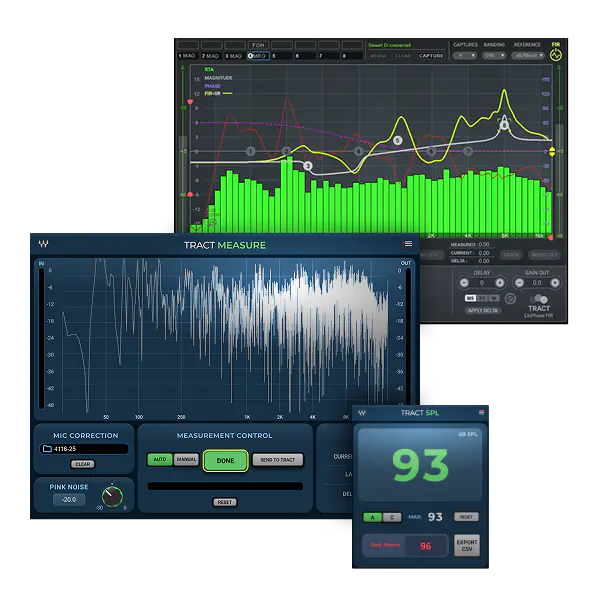
{"versions":[{"documentName":"TRACT System Calibration","versions":"V17, V16, V15, V14, V13, V12, V11, V10"}],"topBanner":"\u003Cp\u003EThis plugin is available in the following Waves versions.\u003C/p\u003E\r\n\u003Cp\u003E\u003Ca href=\u0022/support/how-to-install-waves-legacy-versions\u0022\u003ELearn how to install Legacy versions\u003C/a\u003E\u003C/p\u003E\r\n\u003Cp\u003E\u003Ca href=\u0022/support/how-to-run-waves-plugins-on-older-operating-systems\u0022\u003ELearn how to install on older operating systems\u003C/a\u003E\u003C/p\u003E","bottomBanner":"\u003Cp class=\u0022info-box\u0022\u003E\r\n\tTRACT Measure and TRACT SPL Meter available in V17 or higher.\r\n\u003C/p\u003E"}