All sample libraries can be installed via Waves Central.
Download high-definition (HD) and/or standard (SD) sample libraries for your sample-based Waves instruments. To play each instrument, you must have at least one of its libraries installed on your computer. Once downloaded, follow the installation instructions.
For optimal download behavior, we recommend you use a Download Manager with ‘Resume’ capability.
All Waves Sample Libraries
Included sample libraries: Bass Fingers, Bass Slapper, Clavinet, Electric 88 Piano, Electric 200 Piano, Electric Grand 80 Piano, Grand Rhapsody Piano.
For COSMOS Sample Finder and InTrigger Drum Replacer samples, please contact Waves Tech Support.
Installation Instructions
Waves Instruments
After you have downloaded the libraries (SD, HD, or both) follow these steps:
Extract the sample library/libraries to the desired location. You can place the samples wherever you want, including external hard drives. Note that if you place the samples in their default location listed below, the samples should be loaded automatically.
Mac: Applications > Waves > Data > Instrument Data > Waves Sample Libraries
Mac users are advised to use Archive Utility (right-click the file and choose to open with Archive Utility).
Launch/Load the instrument, either as a plugin or as a standalone application.
If prompted to “Please locate your Waves instrument’s Sample Library folder,” navigate to the location where you’ve extracted your sample library and click OK.
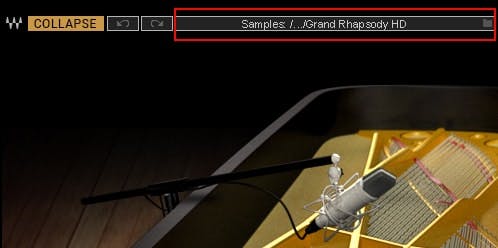
Information about the samples folder is shown in the WaveSystem toolbar. To select a different sample library or a different library location, click on the Sample Library bar (highlighted below) and navigate to the desired folder.
false
false
This content is not available in your country.
PRODUCTION
62efece9-1c69-412e-a5e5-4ca9e36e49fa
https://media.wavescdn.com
public
https://register.waves.com
b705eb6e-5be8-46d1-a9e3-8fbf47be7a04
n
<div class="msg-box text-left mb-12">You may find this content helpful: To be able to view it, <a href="/legal/cookie-policy" target="_top" title="">allow Performance Cookies here</a>.</div>
False
False
91aa97c2-759f-47db-8dde-d474ed2ac365
True
Start Free
true
true
false
voTekqO2wEJBRRQbsEWTHeJEaV5FbTWvet3JZATG
652445
6LeG-IcUAAAAAIb42eguHdUztlZNcrLPhuk81WSM
6LftoDMUAAAAAC9QpaYXNehGHSu__XxRJyFAIgkJ
6LeIxAcTAAAAAJcZVRqyHh71UMIEGNQ_MXjiZKhI
14
5
2026
5
53
9
80
30
#000000
#fff
#fff
#000
#e8e8e8
{
"before": [{
"text": "Waves Creative Access",
"link": "/subscriptions",
"design": "link"
}, {
"text": "Start Free",
"link": "/subscriptions",
"design": "button"
}
],
"beforeOlm": [{
"text": "AI Mastering Online",
"link": "/online-mastering",
"design": "link"
}, {
"text": "Try Now",
"link": "/online-mastering",
"design": "button"
}
],
"topMenu": [{
"text": "Products",
"link": "/products",
"subMenu": [{
"sectionTitle": "Plugins",
"sectionItems": [{
"text": "Plugins",
"link": "/plugins",
"tagline": "Shape your mixes, masters and productions with award-winning plugins",
"icon": "plugins"
}, {
"text": "Bundles",
"link": "/bundles",
"tagline": "Save big on your favorite tools with our curated plugin collections",
"icon": "bundles"
}, {
"text": "Waves Creative Access",
"link": "/subscriptions",
"tagline": "Subscribe to the world’s biggest plugin collection: Try free for 7 days",
"icon": "creative-access"
}, {
"text": "StudioVerse",
"link": "/studioverse",
"tagline": "Access a massive online library of plugin chains directly from your DAW",
"icon": "studioverse"
}, {
"text": "Mixers & Racks",
"link": "/mixers-racks",
"tagline": "Mix with the Waves LV1 mixer console or supercharge your setup with real-time plugin racks",
"icon": "mixers-racks"
}, {
"text": "Waves Audio Courses",
"link": "/courses",
"tagline": "Level up your skills with courses taught by Grammy–winning engineers",
"icon": "courses"
}
]
}, {
"sectionTitle": "Online Services",
"sectionItems": [{
"text": "AI Mastering Online",
"link": "/online-mastering",
"tagline": "Master your tracks online with Grammy-winning AI technology ",
"icon": "olm"
}, {
"text": "Voice ReGen",
"link": "/voice-regen",
"tagline": "Remove Background Noise from Audio and Video w/ AI",
"icon": "illugen"
}, {
"text": "ILLUGEN",
"link": "/illugen",
"tagline": "AI text-to-sample engine: Generate sounds from your wild imagination",
"icon": "illugen"
}, {
"text": "Waves Stream",
"link": "/plugins/waves-stream",
"tagline": "Stream audio in real time when collaborating remotely",
"icon": "stream"
}
]
}, {
"sectionTitle": "Hardware",
"sectionItems": [{
"text": "eMotion LV1 Classic",
"link": "/mixers-racks/emotion-lv1",
"tagline": "",
"icon": "hardware"
}, {
"text": "SuperRack LiveBox",
"link": "/hardware/superrack-livebox",
"tagline": "",
"icon": "hardware"
}, {
"text": "SoundGrid Servers",
"link": "/hardware/soundgrid-servers",
"tagline": "",
"icon": "hardware"
}, {
"text": "SoundGrid Interfaces",
"link": "/hardware/soundgrid-interfaces",
"tagline": "",
"icon": "hardware"
}, {
"text": "System Builder",
"link": "/system-builder",
"tagline": "Customize your Waves system for live sound mixing",
"icon": "system-builder"
}, {
"text": "All Hardware",
"link": "/hardware",
"tagline": "Mix with the Waves LV1 Classic console or by adding real-time processing to any console",
"icon": "hardware"
}
]
}
]
}, {
"text": "Solutions",
"link": "/solutions",
"subMenu": [{
"sectionTitle": "Studio",
"sectionItems": [{
"text": "Plugins",
"link": "/plugins",
"tagline": "Shape your mixes, masters and productions with award-winning plugins",
"icon": "plugins"
}, {
"text": "Bundles",
"link": "/bundles",
"tagline": "Save big on your favorite tools with our curated plugin collections",
"icon": "bundles"
}, {
"text": "Waves Creative Access",
"link": "/subscriptions",
"tagline": "Subscribe to the world’s biggest plugin collection: Try free for 7 days",
"icon": "creative-access"
}, {
"text": "AI Mastering Online",
"link": "/online-mastering",
"tagline": "Master your tracks online with Grammy-winning AI technology ",
"icon": "olm-blue"
}, {
"text": "StudioVerse",
"link": "/studioverse",
"tagline": "Access a massive online library of plugin chains directly from your DAW",
"icon": "studioverse"
}, {
"text": "Voice ReGen",
"link": "/voice-regen",
"tagline": "Remove Background Noise from Audio and Video w/ AI",
"icon": "illugen"
}, {
"text": "ILLUGEN",
"link": "/illugen",
"tagline": "AI text-to-sample engine: Generate sounds from your wild imagination",
"icon": "illugen-blue"
}
]
}, {
"sectionTitle": "Live Sound",
"sectionItems": [{
"text": "Live Sound",
"link": "/live-sound",
"tagline": "Bring studio-quality sound to live events of any size",
"icon": "live-sound"
}, {
"text": "Houses of Worship",
"link": "/houses-of-worship",
"tagline": "Deliver crystal-clear sound to every seat and every stream, trusted by churches worldwide",
"icon": "how"
}, {
"text": "Broadcast Audio",
"link": "/broadcast-audio",
"tagline": "Mix superior broadcast sound, including cloud-based solutions",
"icon": "broadcast"
}
]
}, {
"sectionTitle": "Consumer Audio",
"sectionItems": [{
"text": "Waves Maxx",
"link": "https://maxx.com",
"tagline": "Enhance laptops, tablets, and speakers with studio-grade audio technology",
"icon": "maxx"
}
]
}
]
}, {
"text": "Downloads",
"link": "/downloads",
"subMenu": [{
"sectionTitle": "Downloads",
"sectionItems": [{
"text": "Waves Central",
"link": "/downloads/central",
"tagline": "Download Waves Central to install or update Waves products",
"icon": "central"
}, {
"text": "All Downloads",
"link": "/downloads",
"tagline": "Browse all available downloads",
"icon": "all-downloads"
}
]
}
]
}, {
"text": "Support",
"link": "/support ",
"subMenu": [{
"sectionTitle": "Support",
"sectionItems": [{
"text": "Install & Activate Products",
"link": "/support/activate",
"tagline": "Get help with the installation and activation of Waves products",
"icon": "install-activate"
}, {
"text": "System Requirements",
"link": "/support/tech-specs/system-requirements",
"tagline": "Review specs to ensure full compatibility with Waves products",
"icon": "system-req"
}, {
"text": "All Support Articles",
"link": "/support",
"tagline": "Explore tips, how-to guides, and troubleshooting in our knowledge base",
"icon": "support-articles"
}, {
"text": "Contact Us",
"link": "/contact-us",
"tagline": "Need help? Our world-class support team is here for you",
"icon": "contact-us"
}
]
}
]
}, {
"text": "Learn",
"link": "/learn",
"subMenu": [{
"sectionTitle": "",
"sectionItems": [{
"text": "Videos",
"link": "/videos",
"tagline": "Watch quick tutorials and deep-dive walkthroughs",
"icon": "videos"
}, {
"text": "Blog",
"link": "/blog",
"tagline": "Read expert insights, tips, and creative techniques",
"icon": "blog"
}, {
"text": "By Topic",
"link": "/tags",
"tagline": "Explore content by category",
"icon": "by-topic"
}, {
"text": "Courses",
"link": "/courses",
"tagline": "Level up your skills with courses taught by Grammy–winning engineers",
"icon": "courses-red"
}
]
},
{
"sectionTitle": "",
"sectionItems": [{
"text": "News",
"link": "/news",
"tagline": "Catch the latest updates and releases from Waves",
"icon": "news"
}, {
"text": "Artists",
"link": "/artists",
"tagline": "See the top creators that use Waves in their sessions",
"icon": "artists"
}, {
"text": "Events",
"link": "/events",
"tagline": "Find out where Waves is showing up live and online",
"icon": "events"
}, {
"text": "Forum",
"link": "https://forum.waves.com",
"tagline": "Join the conversation with fellow producers and engineers",
"icon": "forum"
}
]
}
]
}, {
"text": "Specials",
"link": "/specials"
}
]
}
[{"bannerGUID":"2e76fc8a-3a6d-4461-8d47-240c619ea29b","bannerDisplayName":"Memorial Day Sale - May 2026","bannerTypeGUID":"dd5f8368-6b03-465f-b570-48baddb35b08","typeName":"OfferFooter","bannerImage":"/images/footer-offer/2026/may/memorial-day-sale-may-2026.jpg","bannerURL":"/plugins","bannerPriority":1,"bannerTitle":"Memorial Day Sale: Shop Plugins","gaValue":"memorial-day-sale-may-2026"},{"bannerGUID":"a04448ca-692d-465a-94b9-b9c04bcfd552","bannerDisplayName":"Memorial Day Sale Coupons - May 2026","bannerTypeGUID":"dd5f8368-6b03-465f-b570-48baddb35b08","typeName":"OfferFooter","bannerImage":"/images/footer-offer/2026/may/coupons-memorial-day-sale-may-2026.jpg","bannerURL":"/specials","bannerPriority":2,"bannerTitle":"Memorial Day Coupons","gaValue":"coupons-memorial-day-sale-may-2026"},{"bannerGUID":"d4286ff5-e6de-4b2f-8bc9-e96a46843f09","bannerDisplayName":"ILLUGEN 2.0 - April 2026","bannerTypeGUID":"dd5f8368-6b03-465f-b570-48baddb35b08","typeName":"OfferFooter","bannerImage":"/images/footer-offer/2026/april/illugen-april-2026.jpg","bannerURL":"/illugen","bannerPriority":4,"bannerTitle":"New! ILLUGEN 2.0","gaValue":"illugen-april-2026"},{"bannerGUID":"e9238c9a-ec9b-4669-b6c9-12a38974902a","bannerDisplayName":"My Recommended Products","bannerTypeGUID":"dd5f8368-6b03-465f-b570-48baddb35b08","typeName":"OfferFooter","bannerImage":"/images/footer-offer/2023/november/my-recommended-products-bf.jpg","bannerURL":"/my-recommended-products","bannerPriority":5,"bannerTitle":"Personal Product Recommendations: See Products","gaValue":"my-recommended-products"},{"bannerGUID":"e6b77202-75d8-4086-b586-af00dc3c289a","bannerDisplayName":"Upgrades","bannerTypeGUID":"dd5f8368-6b03-465f-b570-48baddb35b08","typeName":"OfferFooter","bannerImage":"/images/footer-offer/2023/september/upgrades.jpg","bannerURL":"/account/upgrades","bannerPriority":6,"bannerTitle":"Upgrade to a Bigger Bundle: See Upgrades","gaValue":"upgrade-to-a-bigger-bundle"},{"bannerGUID":"ba16dbd5-bdde-40ea-8517-cb420402d004","bannerDisplayName":"Waves V16 Update","bannerTypeGUID":"dd5f8368-6b03-465f-b570-48baddb35b08","typeName":"OfferFooter","bannerImage":"/images/footer-offer/2025/december/v16-update-dec-2025.jpg","bannerURL":"/v16","bannerPriority":7,"bannerTitle":"V16 Update: Learn More","gaValue":"v16-update-dec-2025"}]